Direct bookings. One simple reservation book.
For independent restaurants: take bookings from your website, Google profile and social pages, then manage tables, guests and arrivals in one place.
Help me get my booking link live ↗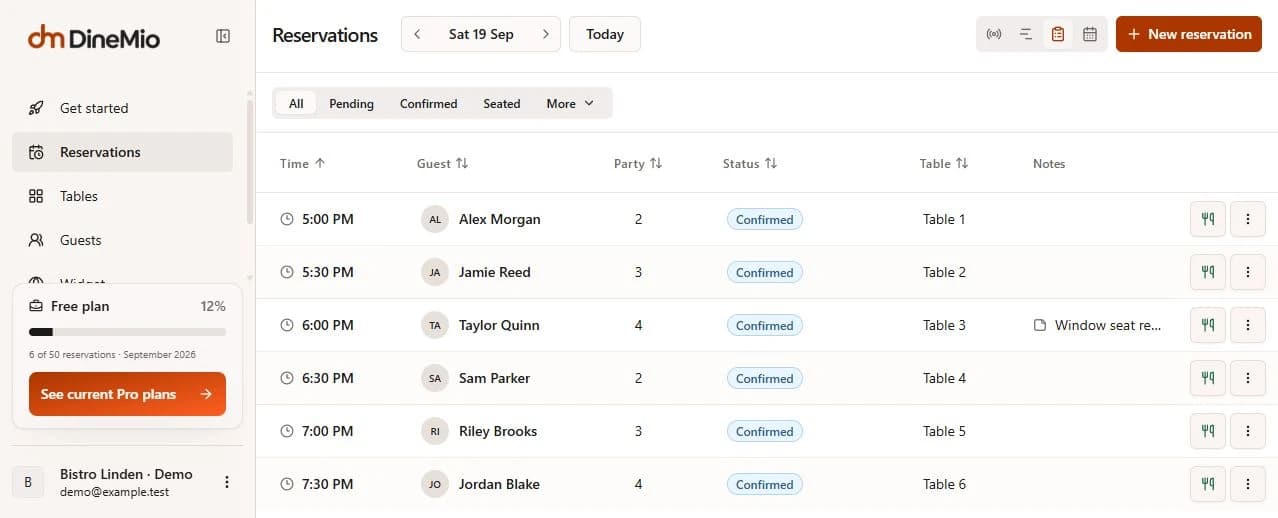
Bookings through the whole service
Before service
Let guests choose a date, party size and available time. Confirmation emails include their booking details and self-service link.
During service
Use the reservation book, timeline or floor plan. Keep notes visible, assign tables and record guest arrivals.
After service
Review booked covers and recorded outcomes. Missing arrival information stays separate from staff-confirmed no-shows.
Try a booking, from guest to table
Explore a demo service at Bistro Linden. Nothing here creates a real reservation or sends an email.
Used in real restaurant service
“The booking flow feels much smoother.”Customer feedback
La Cocotte · ’s-Hertogenbosch, Netherlands
- Reservations to date
- 1,119
- reservations handled
- Average · last 30 days
- 235
- reservations per restaurant / month
Free or Pro
Free
Start with your restaurant’s first 50 bookings each month.
No credit card required
Start freePlan highlights
- All core DineMio capabilities (see comparison below)
- Up to 50 reservations per month
Pro
For busy services, with unlimited bookings and your own branding.
Billed monthly · Excluding VAT
Choose ProEverything included, plus
- Unlimited reservations
- Remove DineMio branding
- Priority support
What changes with Pro
Every core capability is available on Free. Pro removes the reservation limit and DineMio branding, and adds priority support.
Included in both plans
Reservations & service
- Live seating plan, timeline and booking notebook
- Online, phone and walk-in reservations
- Drag-and-drop floor plans with AI import
- Multi-table assignments and automatic table combinations
- Table status, arrival tracking and service automations
Online booking
- Embeddable website booking widget
- Real-time availability and automatic table assignment
- Booking windows, lead times, buffers and special hours
- Special-request capture
- Automatic or manual booking approval
Guest experience & CRM
- Confirmation and reminder emails
- Guest self-service changes and cancellations
- Booking flow in six languages
- Guest profiles, tags, notes, segments and visit history
- CSV export and duplicate-profile merging
Restaurant management
- Tables, areas, capacities and operating hours
- Team users and role-based access
- Closures and recurring schedule overrides
From setup to your first service
Set your hours and tables, try the safe preview, then publish your booking link. Installation help is available directly from the founder.